for more help contact makeareply@gmail.com
1. Using an archiver such as WinRAR, open the jar file.
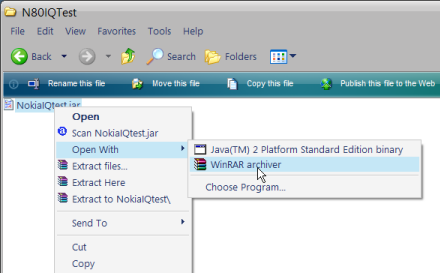
2. Once you have opened the jar, you will see a folder called META-INF. Open this folder.
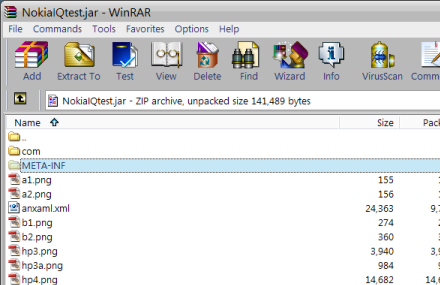
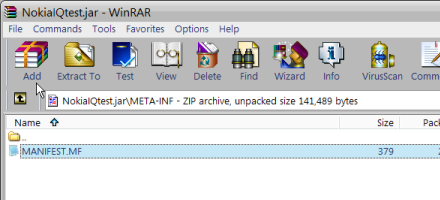
3. In the META-INF folder there will be one file called MANIFEST.MF. Drag this file onto your desktop and open it in notepad.
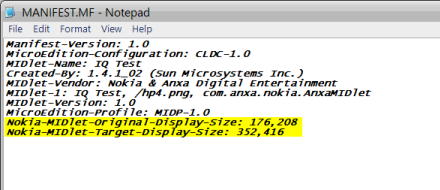
4. Now you must know 2 things to edit the file. First, you must know the original resolution of the game. Usually this information can be found on the author's website. Second, you must know the resolution of your screen. Then type the following two lines at the end of the text at the end of the MANIFEST.MF file:
Nokia-MIDlet-Original-Display-Size: www,xxx
Nokia-MIDlet-Target-Display-Size: yyy,zzz
In the example above 'www,xxx' represents the original resolution of the game. 'yyy,zzz' represents the resolution of your phone's display.
In the picture example below, the original game resolution is 176x208 and the target resolution of my screen (N80IE) is 352x416.
5. Now save the changes in the MANIFEST.MF file and drag it back into the META-INF folder in your jar file to overwrite the old one.

6. That's it! Now install the jar to your phone and enjoy your full screen game.
you can have to change the screen size according to your wants
for more help contact makeareply@gmail.com
Here is the Mobile Office, Airtel Live and Airtel MMS settings for ALL CHINA Mobiles
1) Mobile Office
first click SERVICES icon in main menu==>DATA ACCOUNT==>GPRS==>EDIT any existing account==>
Account Name--> MO
APN-->airtelgprs.com
Auth. Type-->Normal
save all the settings.
Come back to SERVICES==>WAP==>SETTINGS==>EDIT PROFILE==>EDIT any existing account==>
Rename Profile==> Mobile Office
Homepage==>Google
data account==> MO (which we created previously)
Connection Type==>
Here u find three option
a) Connection-oriented
b) Connectionless
c) HTTP
choose a) Connection-oriented==>
IP Address==>202.056.231.117
Security==> off
Again save all the settings and click BACK button and choose "Activate Profile"
Come back to SERVICES==>WAP==>Homepage
and you r ready to use Mobile Office...
2) Airtel Live
first click SERVICES icon in main menu==>DATA ACCOUNT==>GPRS==>EDIT any existing account==>
Account Name--> LIVE
APN-->airtelfun.com
Auth. Type-->Normal
save all the settings.
Come back to SERVICES==>WAP==>SETTINGS==>EDIT PROFILE==>EDIT any existing account==>
Rename Profile==> Airtel Live
Homepage==>http://live.airtelworld.com
data account==> LIVE (which we created previously)
Connection Type==>
Here u find three option
a) Connection-oriented
b) Connectionless
c) HTTP
choose c) HTTP==>
Proxy Address==>100.001.200.099
Proxy Port==> 8080
Again save all the settings and click BACK button and choose "Activate Profile"
Come back to SERVICES==>WAP==>Homepage
and you r ready to use Airtel Live...
3) Airtel MMS
first click SERVICES icon in main menu==>DATA ACCOUNT==>GPRS==>EDIT any existing account==>
Account Name--> MMS
APN-->airtelmms.com
Auth. Type-->Normal
save all the settings.
Come back to SERVICES==>WAP==>SETTINGS==>EDIT PROFILE==>EDIT any existing account==>
Rename Profile==> Airtel MMS
Homepage==>http://100.1.201.171:10021/mmsc
data account==> MMS (which we created previously)
Connection Type==>
Here u find three option
a) Connection-oriented
b) Connectionless
c) HTTP
choose c) HTTP==>
Proxy Address==>100.1.201.172
Proxy Port==>8799
Again save all the settings and click BACK button and choose "Activate Profile"
Come back to SERVICES==>WAP==>Homepage
and you r ready to use Airtel MMS...
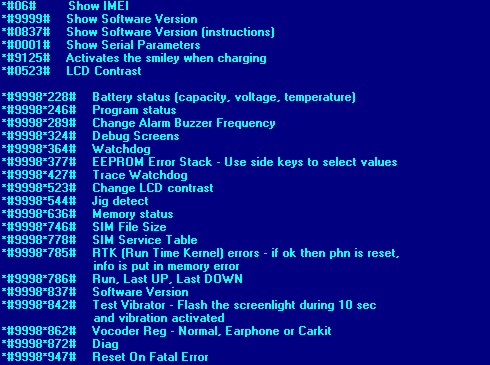
Show IMEI
*#06#
Show Software Version
*#9999#
Show Software Version (instructions)
*#0837#
Show Serial Parameters
*#0001#
Activates the smiley when charging
*#9125#
Battery status (capacity, voltage, temperature)
*#9998*228#
Program status
*#9998*246#
Change Alarm Buzzer Frequency
*#9998*289#
Debug screens
*#9998*324#
Watchdog
*#9998*364#
EEPROM Error Stack - Use side keys to select values. Cancel and ok.
*#9998*377#
Trace Watchdog
*#9998*427#
Change LCD contrast
*#9998*523#
Jig detect
*#9998*544#
Memory status
*#9998*636#
SIM File Size
*#9998*746#
SIM Service Table
*#9998*778#
RTK (Run Time Kernel) errors
*#9998*785#
Run, Last UP, Last DOWN
*#9998*786#
Software Version
*#9998*837#
Test Vibrator - Flash the screenligth during 10 seconds and vibration activated
*#9998*842#
Vocoder Reg - Normal, Earphone or car kit can be selected
*#9998*862#
Diag
*#9998*872#
Reset On Fatal Error
*#9998*947#
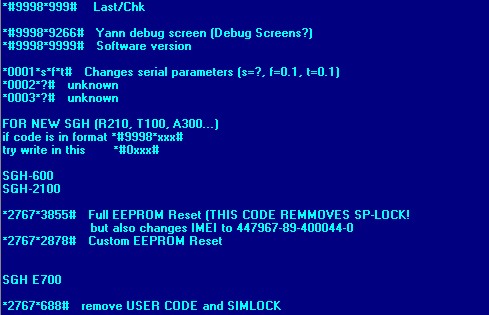
Last/Chk
*#9998*999#
Yann debug screen
*#9998*9266#
Software version
*#9998*9999#
Changes serial parameters (s=?, f=0,1, t=0,1)
*0001*s*f*t#
for more help contact makeareply@gmail.com
LG all models test mode: Type 2945#*# on the main screen.
2945*#01*# Secret menu for LG
IMEI (ALL): *#06#
IMEI and SW (LG 510): *#07#
Software version (LG B1200): *8375#
Recount cheksum (LG B1200): *6861#
Factory test (B1200): #PWR 668
Simlock menu (LG B1200): 1945#*5101#
Simlock menu (LG 510W, 5200): 2945#*5101#
Simlock menu (LG 7020, 7010): 2945#*70001#
Simlock menu (LG 500, 600): 2947#*
LG-U81XX SPECIAL CODES
Code to read phone version :
- Phone without SIM
- Enter 277634#*# or 47328545454#
- Select 'SW Ver.info'
Code to reset phone :
- Phone without SIM
- Enter 277634#*# or 47328545454#
- Select 'Factory Reset'
Code to enter UNLOCK MENU :
- Phone wit SIM inside
- Enter 2945#*88110#
Test Menu 8330 : 637664#*#
Test Menu 8180 V10a: 49857465454#
Test Menu 8180 V11a: 492662464663#
Test Menu 8130-8138: 47328545454#
Test Menu 8110-8120: 277634#*#
for more help contact makeareply@gmail.com
Check the IMEI (International Mobile Equipment Identity)
*#06#
Reset the phones menu-language to English.
*#0000#
Check the software release information
>*<<*<* Shortcut for Last Dialed call menu If you for some reason don't want to enter the 'Last Dialed calls menu' by using the 'YES' key you can use the following key stroke instead: First '0' then '#'. Bat. level indicator when turned OFF... When the gh688 is turned off and the phone is not changing - the bat. level can be seen for a short period of time by pressing the 'NO' key quick once (it has to be quick!) and then wait for about 2 sec. The bat. level will now be shown in the display at its normal position. Access menu without Sim card To access to the menu in your phone without having a card inside do the following: type **04*0000*0000*0000# When display say "Wrong Pin" press NO and you have access to the all menus: Info, Access, Settings, Calculator, Clock, Keylock On?, Mail, Phone book. NOTE: If you try this on the GH688 your phone may stop at Keylock On? menu and you´ll have to take your battery out to turn the phone on again. Full Network Name You can see the Full Network Name by doing the following: Go to the network menu, when the phone displays the networks available (in 'Select net' and 'Edit list' menu) you can press * and you will see the full name. Full Operator List You can view the full operator list by doing the following: Go to the 'Edit list' menu under 'networks'. The phone say 'please wait' (searching for other networks). When finished, Press the <> keys.
How to enable net monitor on Ericson 688
1. Remove SIM from phone
2. Dial 112, press YES, hear something,
3. Dial 112YESNO
4. Press <>Ericsson 628 Secrets (also work on other models)
Check the IMEI (International Mobile Equipment Identity)
*#06#
Reset the phones menu-language to English.
*#0000#
To see the time and date
*#103#
Check the software release information
>*<<*<* Shortcut for Last Dialed call menu If for some reason you don't want to enter the 'Last Dialed calls menu' by using the 'YES' key you can use the following key stroke instead: First '0' then '#'. Battery level indicator when turned OFF When the phone is turned off and the phone is not changing - the battery level can be seen for a short period of time by pressing the 'NO' key quick once (it has to be quick!) and then wait for about 2 sec. The battery level will now be shown in the display at its normal position. Access menu without Sim card To access to the menu in your phone without having a card inside do the following: type **04*0000*0000*0000# When display say "Wrong Pin" press NO and you have access to the all menus: Info, Access, Settings, Calculator, Clock, Keylock On?, Mail, Phone book. Alarm Clock Menu Go to MissedCall Empty the list Press the -> key for a second or two
The option Menu size turns up
Choose 'yes' and go from there.
You can make free phone calls with GA628 (also work on other models)
NOTE: This trick has only been reported working on PREPAID GSM CARDS and in some countries and with some software versions.
The prepaid GSM SIM CARD is a kind of "SIM card" which only has a certain amount of credit on it.
Here's the trick: Dial the number normally and press YES. While "connecting" is shown on the screen, the following procedure should be carried out:
Press CLR then 0 then # and then NO (twice) so as to switch OFF the phone. You can then still speak on the phone while it is switched off but the SIM card does not record your calls which will lead to FREE phone calls in some countries.. I hope!!
for more help contact makeareply@gmail.com
Secret Engineering menu (menu 10) appear
*#3262255*8378#
Display the IMEI
*#06#
To set the language automatically (Reset to English)
*#0000#
Set the Enhaced Full Rate
*#3370#
Reset the phone
#3370#
Enter sim lock code
*#9000#
Enter the network code
*#9003#
Enter the subset code
*#9004#
Remove the sim lock permanently
*#9100#
Remove the corporate lock permanently
*#9101#
Remove the provider lock permanently
*#9102#
Remove the network lock permanently
*#9103#
Remove the subset lock permanently
*#9104#
Bosch 738 (also work on other models)
Secret Engineering menu (menu 10) appear
*#3262255*8378#
Display the IMEI
*#06#
To set the language automatically (Reset to English)
*#0000#
Set the Enhaced Full Rate
*#3370#
Reset the phone
#3370#
Enter sim lock code
*#9000#
Enter the network code
*#9003#
Enter the subset code
*#9004#
Remove the sim lock permanently
*#9100#
Remove the corporate lock permanently
*#9101#
Remove the provider lock permanently
*#9102#
Remove the network lock permanently
*#9103#
Remove the subset lock permanently
*#9104#
Bosch COM607 (also work on other models)
Secret Engineering menu (menu 10) appear
*#3262255*8378#
Display the IMEI
*#06#
To set the language automatically (Reset to English)
*#0000#
Set the Enhaced Full Rate
*#3370#
Reset the phone
#3370#
Enter sim lock code
*#9000#
Enter the network code
*#9003#
Enter the subset code
*#9004#
Remove the sim lock permanently
*#9100#
Remove the corporate lock permanently
*#9101#
Remove the provider lock permanently
*#9102#
Remove the network lock permanently
*#9103#
Remove the subset lock permanently
*#9104#
Bosch 908 (also work on other models)
Secret Engineering menu (menu 10) appear
*#3262255*8378#
Display the IMEI
*#06#
To set the language automatically (Reset to English)
*#0000#
Set the Enhaced Full Rate
*#3370#
Reset the phone
#3370#
Enter sim lock code
*#9000#
Enter the network code
*#9003#
Enter the subset code
*#9004#
Remove the sim lock permanently
*#9100#
Remove the corporate lock permanently
*#9101#
Remove the provider lock permanently
*#9102#
Remove the network lock permanently
*#9103#
Remove the subset lock permanently
*#9104#
Bosch 909/909s (also work on other models)
Display the IMEI
*#06#
Set the language automatically
*#0000#
Set the Enhanced Full Rate
*#3370#
Reset the phone
#3370#
Enter sim lock code
*#9000#
Enter the network code
*#9003#
Enter the subset code
*#9004#
Remove the sim lock permanently
*#9100#
Remove the corporate lock permanently
*#9101#
Remove the provider lock permanently
*#9102#
Remove the network lock permanently
*#9103#
Remove the subset lock permanently
*#9104#
for more help contact makeareply@gmail.com
Show IMEI
*#06#
Tetris
Power on phone and enter PIN. before phone has locked onto network, F9, send own number, hit right button, hit 9. left is 2, right is 8, rotate is 5,
and drop is 4.
Monitor Mode
Menu, 9 (Phone Options), 7 (Phone Status), Left Display Button (left MENU key), 5553756, HangUp Button (Red HandSet key)
Now "Monitor" should appear at the bottom of the Network Options menu.
Pressing the right Display Button when in monitor mode will show a list of the
six cells with the strongest signals.
for more help contact makeareply@gmail.com
Enter Engineering menu
MENU - 5 - 1 - 1 - #
1) IMEI
2) Flash Eprom etc.
3) ?
4) SP unblock
5) ?
6) Contrast Settings.
When in menu type * and a new menu with new options will appear.
for more help contact makeareply@gmail.com
Manual GPRS settings:
Most of people have face problems regarding gprs settings on their mobile phones. I have been getting lots of public reviews about how to configure and where to get gprs setting, So I publish here most of gprs settings for most of mobile service operator (India) to enter in your phone mannulay. Here you have manual gprs settings for vodafone, hutch, idea, airtel, bsnl, airtel live, airtel mobile you can enter in your phone and configure mannually.
Idea gprs Settings:
Account Name - idea_GPRS
Username - leave Blank
Password - leave Blank
Homepage - http://wap.ideafresh.com
Proxy and Server Port - 8080
Proxy and Server adress - 010.004.042.045
Databearer - GPRS / Packetdata
Acces Point Name - imis
Proxy - Enabled/yes
Authentication Type - Normal
Hutch or Vodafone Essar gprs Settings:
Account Name - Vodafone Live
User Name - leave Blank
Password - leave Blank
Proxy - Enabled/yes
Access Point Name - portalnmms
Proxy - Enabled/yes.
Proxy and Server address - 010.010.001.100
Proxy and Server Port - 9401 or 8080
Homepage - http://live.vodafone.in
Authentication Type - Normal
Airtel gprs Settings:
Account Name - Airtel_gprs
User Name - leave Blank
Password - leave Blank
Homepage - http://live.airtelworld.com
Proxy - Enabled/yes.
Proxy and Server Adress - 202.56.231.117
Proxy and Server Port - 8080
Data bearer - GPRS or Packet Data.
Access Point Name - airtelgprs.com
Authentication Type - Normal
Use preferred access point - No
Airtel live settings
Account Name - Airtel_live
Homepage - http://live.airtelworld.com
Username - leave Blank
Password - leave Blank
Proxy - Enabled/yes
Proxy and Server Adress - 100.001.200.099
Accespoint Name - airtelfun.com
Proxy and Server Port - 8080
Data bearer - GPRS/ Packet Data
Authentication Type - Normal
BPL gprs Settings:
Account Name - BPL WAP
Username - leave blank
Password - leave blank
Proxy - Enabled/yes
Homepage - http://wap.mizone.bplmobile.com
Proxy and Server address - 10.0.0.10
Proxy and Server Port - 8080
Acces Point Name - mizone
Data bearer - GPRS/ Packetdata
Authentication Type - Normal
BSNL gprs Settings:
Account Name - bsnlwap
Username - leave blank
Password - leave blank
Proxy - Enabled/yes
Homepage - http://wap.cellone.in
Proxy and Server address - 010.132.194.196
Proxy and Server Port - 8080
Acces Point Name - wapnorth.cellone.in
Data bearer - GPRS/ Packetdata
Authentication Type - Normal
for more help contact makeareply@gmail.com
View IMEI
*#06#
Show Software version and manufacture date
# 8377466 #
Alcatel One Touch Secrets
View IMEI Number
*#06#
Enter Service Menu
*#000000#
View Secret Menu
000000 then press *
for more help contact makeareply@gmail.com
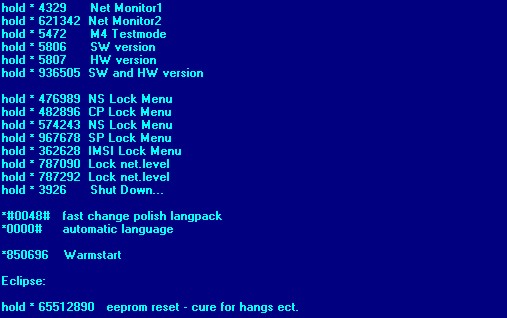
Monitor mode
Hold C and press 379
Secret menu
Hold C and press 987
Version number
Hold C and press 597
Phase1 and 2
Hold C and press 499
Warm start
Hold C and press 179
Instant turn off
Hold C and press 999
Unlock menu
Hold C and press 787090
for more help contact makeareply@gmail.com
View IMEI Number
*#06#
RBS
Activate RBS
(Note: pause means the * key held in until box appears)
To activate RBS type: [pause] [pause] [pause] 1 1 3 [pause] 1 [pause] [ok]
You now have to press the [MENU] and scroll to the 'Eng Field Options' function with the keys, and enable it.
De-activate RBS
To de-activate RBS type: [pause] [pause] [pause] 1 1 3 [pause] 0 [pause] [ok]
This only works with some versions of software.
What's the use of RBS
Get Distance From Base Station - Place a call, when it is answered, press [MENU] until 'Eng Field Option' is displayed, press [OK], select 'Active Cell', press [OK], press [MENU] until 'Time Adv xxx' appears, where xxx is a number. Multiply this number by 550, and the result is the distance from the RBS (Radio Base Station), in meters.
Get Signal Quality - press [MENU] until 'Eng Field Option' is displayed, press [OK], select 'Active Cell', press [OK], press [MENU] until 'C1' appears. This is the signal quality. If it becomes negative for longer than 5 seconds, a new cell is selected.
for more help contact makeareply@gmail.com
See IMEI code
*#06#
Reset to defaults
*73738#
Show Software version
*#2820#
SP Lock info
The procedure will show if your phone is locked.
*#3210# for SIM lock info,
*#8140# for Net lock info.
SIM lock
*#4960 # - Inquiry * 4960 * password * password # (send?) to Lock
#4960* password # to Unlock
[password] is an 8 digits number
Net Lock
*#7320# - Inquiry * 7320 * password * password # to Lock.
#7320* password # to Unlock.
[password] is an 8 digits number
Net Lock 2
*#2220# - Inquiry * 2220 * password * password # to Lock
#2220* password # to Unlock
[password] is an 8 digits number
ü Subnet Lock
*#1110# - Inquiry * 1110 * password * password # to Lock
#1110* password # to Unlock [password] is an 8 digits number
for more help contact makeareply@gmail.com